Built for selling Windows hosting#
Running Windows hosting as a business means more than keeping IIS alive. You define products, sell them directly and through resellers, keep accounts from harming each other, answer support tickets quickly and automate the boring parts. StackRegent is a Windows reseller hosting control panel designed around those jobs, for web hosts, managed service providers, agencies and resellers on Windows Server 2016, 2019, 2022 and 2025.
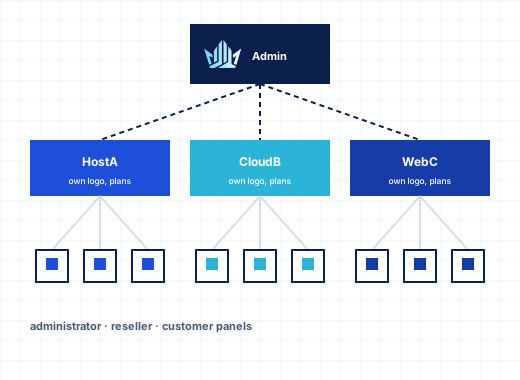
It has three levels, each with its own panel. Administrators run the server and everything on it. Resellers run their own customers, plans and branding inside the totals you give them. Customers manage their own sites, mail and databases, and can invite colleagues with limited roles. Every level is included in every plan.
Products: service plans and add-ons#
A hosting plan is the product you sell: it sets what a subscription gets, grouped into resources, permissions, hosting, PHP, mail, DNS, performance and logs. When you create a subscription, the panel applies the plan to the IIS site, the application pool, the mail settings and the job-object limits.
Add-on plans extend a subscription without a new plan for every variation: more disk, more mailboxes, an extra PHP option. Keep a short list of base plans and attach add-ons where customers need them. When one customer needs a one-off arrangement, an administrator can customize a single subscription without touching the plan, and the subscription's usage page shows when an upgrade is due. Customers can lower some hosting options in their own panel but never raise them above the plan.
Some permissions are deliberately off on new plans, such as backup and restore to the server's storage or to remote storage, so you decide which products include backups. SQL Server backup and restore starts on.
Resellers and overselling#
A reseller plan gives a reseller totals of disk space, traffic, domains, mailboxes and other resources, plus permissions for what they may do. Inside those totals, the reseller creates customers and subscriptions, builds their own hosting plans and add-ons, puts their own title, logo and favicon on their customers' panel, opens a customer's panel with Log in as customer, adds panel users, and creates API keys for scripts and billing systems.
Overselling is a business decision, so it is a setting. With Allow overselling off, the default, every plan a reseller sells must fit into what remains of their totals, and a plan that does not fit is refused with a message that says why. With it on, resellers can sell more than their totals, because most customers never use their full plan; only customer and subscription counts are still enforced. If their customers really use more than the reseller plan allows, you receive a notice, at most once a month per limit.
Administrators keep control: convert a customer into a reseller or back, change status, log in as them, assign shared or dedicated IP addresses, and run backups per client. More in resellers and branding.
Your brand, not ours#
Customers should see your name when they sign in. Set the panel title, logo, favicon and login background, give the panel a custom URL under your own host name with a Let's Encrypt certificate, and add custom buttons that link to your help desk or billing area. Notification templates for email and the in-panel bell are editable, so welcome messages and limit warnings sound like you. Choose the Service Provider view for a hosting business or the Power User view for a single-owner server.
Customer users and roles#
Business customers rarely share one login. Customers add users with built-in roles, Domain Administrator, WebMaster, Application User, Accountant and Mail User, or define up to 50 custom roles over areas such as websites, files, mail, databases, FTP, apps, DNS, statistics, scheduled tasks, backups, users, account and mailbox. A developer gets websites and files; an accountant gets the account; a member of staff gets only their mailbox. Delegation without password sharing cuts a whole category of tickets.
Keeping shared servers fair#
Shared Windows hosting only works when accounts cannot harm each other. Every subscription runs as its own Windows user in its own IIS application pools, with PHP through FastCGI as that user. Its websites, PHP and scheduled tasks run in a Windows job object capped for CPU, memory, disk I/O and process count, and limit-reached counters show who keeps hitting them. Customers see their own usage on the Resources page, which turns upgrade conversations into a shared look at the numbers.
Mail gets the same treatment: hourly outgoing recipient limits per domain and subscription stop one compromised contact form from getting your IP address listed, and Outgoing Mail Control shows who is near their limit. See resource limits and isolation.
Automation and billing#
There is no ready-made billing-system plugin. Instead, the REST API covers every panel action and is described in OpenAPI 3, so any billing or provisioning system can create customers, subscriptions and domains, suspend and remove them. API keys act exactly as the administrator, reseller or customer who made them, so a reseller's key can only reach that reseller's accounts. On the server, the stackregent.exe command line and the Event Manager, which runs your commands when panel events happen, cover the rest. See API and automation and the developer documentation.
Operations at scale#
Monitoring graphs the server every minute and emails you when a value stays high or a service stops. The Advisor rates the configuration with one-click fixes, Diagnose & Repair checks and repairs services, IIS, mail, DNS, databases and NTFS permissions, and the action log records who changed what. Backups run on schedules at server, client and subscription level to S3-compatible storage, SFTP or FTP.
When you add servers or rebalance customers, the Migration & Transfer Manager moves subscriptions between StackRegent servers over HTTPS, and brings them in from Plesk for Windows with customers keeping their passwords. See the migration page.
Licensing that follows your accounts#
Each server needs one license, priced by the number of hosting accounts it holds. Every plan has every feature, including the reseller panel; domains, mailboxes and databases inside an account are unlimited. If a license ever lapses, the panel restricts only the administrator area: websites, mail, DNS and customer and reseller panels keep working. See the pricing page, or join the partner program if you resell licenses.
Start with the 10-day free trial: build two plans, create a reseller with a small reseller plan, and log in as one of its customers.
Frequently asked questions
Can I sell reseller hosting on Windows with StackRegent?
Yes. Every plan includes the reseller panel. Resellers manage their own customers, subscriptions, hosting plans, branding, panel users and API keys within the totals of their reseller plan.
How does StackRegent handle overselling?
It is a setting on the reseller plan. Off by default, every plan a reseller sells must fit into their totals. When it is on, only customer and subscription counts are enforced, and the administrator gets a notice at most once a month per limit when real usage exceeds the plan.
Is there a WHMCS or billing module?
There is no ready-made billing plugin. Billing systems provision through the REST API, which covers every panel action, using an administrator or reseller API key.
Can I white-label the panel?
Yes. Set the title, logo, favicon, login background, a custom panel URL and custom buttons, and edit notification templates. Resellers can apply their own branding for their customers.
How is StackRegent licensed for hosting providers?
Per server, by the number of hosting accounts. Every plan has every feature, and domains, mailboxes and databases inside an account are unlimited.
Can customers give their staff limited access?
Yes. Customers add users with five built-in roles or up to 50 custom roles, each limited to chosen areas such as websites, mail or databases.